Showing posts with label facebook for business. Show all posts

Monday, January 30, 2017

Which Facebook Ad is Right for your Business? Part Four

DIY FACEBOOK ADVERTISING: How to Pick which Facebook Ad is Right for your Business? Part Four


To Boost a Post or Not to Boost that is the Question? Philosophy often interferes in Marketing. Simply because there is a bit of theory on why people buy, when they buy and if we can influence their buying decisions. When considering all these aspects you have some decisions to make. Including WHICH Facebook Advertising Tool is Right for You?

Meanwhile be sure to visit our NEW BLOG HOME at joannekleemarketing.com today.

While I got into some details on HOW TO Pick a Post to Boost in Part Two and the Difference Between Boosting a Post and Promoting a Post in Part Three, here we can tell you about one additional option - which is TRUE ADVERTISING - A Newsfeed Ad.

We have covered many Facebook, Marketing, and Advertising Terms in this blog series on Facebook Advertising. We have a consolidated list of terms here at our new blog home and website. I recommend you take a peek at the list and familiarize your self or use it as a reference list on your Facebook Advertising Journey. The Blog Roll Continues there....

NEWSFEED ADVERTISING

Beyond the existing posts on your page, Facebook Allows you to become your own ad agency and create your own ad from scratch. Yes, you pick the image, the words and run your ad. Create a clever tagline, offer and be the Creative Director behind it all. Facebook Ads Manager tool gives you the access to running an Ad Promotion in Facebook. 


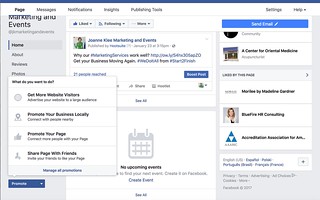
This screen shot of my Facebook page shows you where to find additional advertising options. Facebook gives you options to:

Facebook Promote Advertising options


1. Promote your website, "Get more website visitors" and Develop your own advertisement. 

2. Promote locally, people in logging into Facebook around your business area will see your sponsored Ad in their newsfeed.

3. Promote your page, and get more likes / fans (obvi so people can see your Facebook business page regularly in their newsfeed and offers on a regular basis.)

4. Share Page with Friends. DO THIS NOW IF YOU HAVEN'T ALREADY. You would share your business page with your friends on your personal Facebook Page. 

Every Facebook Business page requires an Administrator. That is a personal page or person who manages your business page. If you are not your page admin, because your friend or a consultant like me set it up - ask for Admin Access - and you can leverage this feature.  


I won't go to in depth here except to let you know that you have options. Some people find leaving this type of advertising to the professionals. But there is no reason why you can't try it on your own. Someone who runs Facebook ads as a career can give your greater insight into the true success of your campaign. We can help you get the most impact per dollar and help ensure you ad message is clear and optimized for Facebook. 


"I can make Facebook Advertising 
Mission Possible for you
and your Business!"   ----- Joanne Klee Marketing


From the Everyday to the Extraordinary...

Joanne

Posted by Joanne Kleé, 
Owner | Consultant

Joanne Klee Marketing & Events
Service Excellence | Detailed | One Stop Solutions


Come meet me where you are:Twitter | Facebook 
WebSite | Blog


Saturday, January 28, 2017

Facebook Boost Post or Promote It. Understanding your Audience, Part Three

DIY Facebook Advertising: Facebook Boost Post or Promote It. Understanding your Audience, Part Three


Let's keep building on the Boost Post you selected in the last blog post review. Hopefully you came into this advertising exercise with some objectives. If not we can review the things to consider when running a Facebook Ad. We have covered many Digital, Facebook, Marketing, and Advertising Terms in this blog series on Facebook Advertising. We have a consolidated list of terms here at our new blog home and website.   


Meanwhile be sure to visit our NEW BLOG HOME at JoanneKleeMarketing.com today.

ADVERTISING PURPOSE


1. What are you advertising? 

What is the purpose of your ad? Do you want to promote a special product? Are you trying to increase traffic to your website to increase sales? Are you running a special offer on something you are selling.

Each of these objectives will have an Advertisement that will best suite the need. If you are running a product special than a post featuring that product is important. Along side the product post you can highlight the discount or special offer. 


2. Who are you making an offer to?

If you are trying to increase website traffic that consider your ideal user. If you sell women's clothes than ideally women are your target audience. But sometimes men buy clothes as gifts, so you might want to consider this in your promotion. 


3. What is the best way to reach your audience?

Now that you have an offer - or ad focus - and you understand your target audience, we can work thru the Boost or Promoted Post audience. 

In the previous post we walked thru how to identify a Post that you have on your Facebook page that is well liked and viewed. What we are not reviewing in this article is WHY the post did well. 


The Boost Post and Promoted Post definitions. 

There are two things to understand when you are about to Boost a Post. Facebook has different terms for running ads on their site. When you will be making a selection for your Ad Audience, it is important to understand the difference. There is no difference in price when you run a Boosted or Promoted post. It really is understanding the audience you are getting in front of. 

Definitions: Boost Post | Promoted Post

BOOST POST
If you pay to run your Post to your existing fans and followers - it is called a Boost Post. Literally taking your Post and Boosting it to Your Facebook Page Fans (followers).

PROMOTED POST
If you pay to run your Post to a larger portion of your fans and a target audience based on your selection criteria, this is called a Promoted Post. Literally taking a Post from your Facebook Page and promoting it to people who DO NOT currently like your page, people you choose through targeting. The option to “Like Page” will only appear to non fans. 

Newsfeed Ad (Advertising)
Realize in this particular process we have not talked about creating Facebook Advertisements from scratch. That is developing the ad and target audience independent of the Posts existing on our page. So the Ad looks like a normal post but has the word sponsored in the newsfeed. 

When it comes time to view the Insights from your promotion, the Like, comment and share data will be shown both on the original post and the boosted post.


The Pro's and Con's of Each Options

A Boost post is circulated just to page fans, so just that limited audience will see your post. But that is not necessarily a bad thing. But there are a few more things to understand in the decision making process.

Exclusive Offers
Perhaps you are running a special offer to EXISTING CUSTOMERS or Fans (Page Followers). Customers love feeling special. So an offer made just to them on a exclusive basis generally gets a good reply. 

Test Market
Perhaps you are offering a new product, and you want to TEST your idea on a group of people who understand your brand and who can offer customer feedback. 

Repeat Purchase
If you had run a deal in the past that was very successful, and you want to run the same offer again next season, or next year, using that same Post again to your existing fan base makes sense. These customers have purchased from your before and would like the offer to make their purchase again. Think Clinique Bonus Days every spring or Victoria's Secret Semi Annual Sale are both examples where a fan base would be beneficial. 

New Products
When offering something new and exciting, and you already have an established brand, a new product offer could be the introduction people need to be induced to exploring your product and website. In this case a promoted post to an expanded audience is beneficial. 

Growing the Business
If you are in growth mode then you will want to include an extensive audience for your offers. Or just promoting your brand to people who have not seen it before. When in growth mode go beyond your fan base. 

A/B Tests
Maybe we don't know which audience is right for you. You can run a program called an A/B test. This is something we marketers use to determine which approach is best for your business. We run test offers to a test audience and review results within a certain time frame. After some data analysis we can make some assumptions on what is the next steps to achieve your goals. Keep in mind that A/B testing has protocol behind it, and there are easy missteps to make if you do not have experience running these tests. 


DIY Boost Post Process, the How To Run an Ad Promotion

Now that you have considered your advertising purpose and understanding your ideal target audience we can look at some screen shots of the actual process on Facebook to run your Boost post. Running a post or an ad is called a Promotion. It doesn't come from Promoted Post. Instead it is derived from Advertising when you run an an Advertisement you are Promoting your Business. Therefore a Promotion. An Ad Campaign is a series of Promotions and channels.

These are some basic screen shots to get your thru the process. I realize that Facebook Advertising can be time consuming, confusing and when you add in the data analysis overwhelming. If you have reached your limit and want addition support you can reach out to me and I can help make this "Mission Possible."

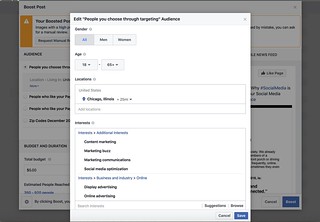
Facebook People You Choose through Targeting | Advertising

Selecting People through Targeting (Target Audience) includes their gender, age, where people are located, and their interests. You do not have to use all these categories, only those applicable to your audience. 

Things to Consider for Location. Location does not mean where people live. Instead it most often relates to WHERE people Log Into Facebook. So it will identify users near the location you select. In addition consider the volume of users near the location. In this example Chicago, Illinois brings a large volume of potential audience.  You can limit the audience more specifically be a neighborhood name or a zip code selector. Perhaps use your existing client list and pulling zip codes from that? Or are you trying to enter a new market, look at zip codes you are targeting getting into. 

When Facebook Identifies HOW MANY PEOPLE you can reach it is only an estimate. Why an estimate? Because it depends how many people are given in that area on a certain day. If there is a Fest happening on the Saturday that you run your ad, you will have a bigger volume of users than on the day the Fest is not happening. These are all factors to consider.

After you have made your target audience selection you click SAVE and the BOOST. Clicking BOOST Starts your campaign.

We have covered many Facebook Advertising terms in this blog series on Facebook Advertising. I recommend you take a peek at the list and familiarize your self or use it as a reference list on your Facebook Advertising Journey.

Good luck. and Happy Posting.
From the Everyday to the Extraordinary...

Joanne

Posted by Joanne Kleé, 
Owner | Consultant

Joanne Klee Marketing & Events
Service Excellence | Detailed | One Stop Solutions


Come meet me where you are:Twitter | Facebook 
WebSite | Blog


Thursday, January 26, 2017

The Basics: How to Pick a Boost Post on Facebook, Part Two

DIY Lesson on How to Advertise on Facebook:  

The Basics: Boost Posts on Facebook. Part Two


Welcome Back to my multi-part series for a "DIY Lesson on how to Advertise on Facebook." If you haven't read the introduction you are missing out on the whole purpose of this conversation. We really need to understand WHY to advertise on Facebook and HOW to Align the Stars for your Business. So give a click here to understand the Advertisement Basics. It is a quick read I promise! 


Meanwhile be sure to visit our NEW BLOG HOME at JoanneKleeMarketing.com/Insights today.


Now that you have your goals under your belt, let's talk about finding that Ideal Boost Post. 

NOTE: This post is written in an informative and education tone, so expect definitions built into the content. 

We have covered many Digital Marketing Terms in this blog series on Facebook Advertising. We have a consolidated list of terms here at our new blog home and website. 

THE BASICS on a FACEBOOK Post  


When you write something for your Business Page wall it is called a "Post." That post is seen (mostly) by those who follow your page. The post will appear in their newsfeed. 

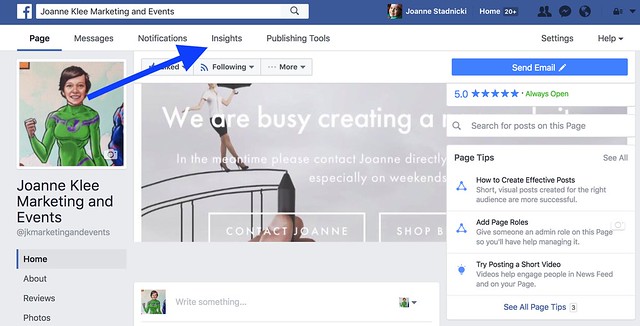
Over time you will want to check you INSIGHTS thru the Facebook Analytics. I am using images of my Facebook Page as an Example. Let's get to work.

Insights, Facebook Advertising How To


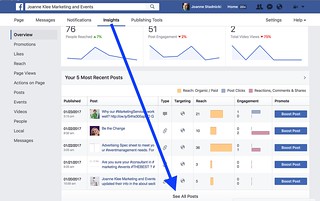
Scroll Down the Insights Page to SEE MORE POSTS.

Find your Facebook Post Insights, learn how to advertise


Keep clicking See More so you can scroll thru your posts. Do you see these numbers under REACH. That is basically how may people had your post appear in their newsfeed. Reach can be Paid or Organic. Click on the Terms Post to get a break down of these Advertising Terms for Facebook.

The older the post the more people have seen it, especially if it was popular. Engagement is another good indicator of Post Success. Engagement breaks down how many people interacted with the post in likes, shares and comments. 

This Analysis is your POST activity. You can review which posts are the most viewed and most clicked on. Facebook also does a really great analysis of ORGANIC posts versus REACH. Organic means people saw it in their newsfeed or via a search. If your page is public it will appear through the key words search. REACH is a combination of actions on the post. Including Comments, Likes and Shares. 

If you want to advertise on Facebook you can take this Post, which you already know had a really good response amongst your Facebook Fans and Boost or Promote it. 


A little note on Which Post to Use: Posts that work really well for an Advertising purpose need to make sense. Posts topics include how you make your product, maybe a recipe or special offer, news about your location or a branding piece reflecting your business personality. Just make sure the post you pick is relevant to today, and a current offer or topic. 


WHEN TO BOOST POST OR PROMOTE?


The post will show organically to (some) of your page fans. To get better reach - to reach more people - it will need to be boosted or promoted. Once you do either of these you can broaden the targeting beyond fans to other Facebook users. Also known as target market. 

A little note on Target Market: do you know your businesses target market. That is your "ideal customer" the one who buys your products or services. Understanding you target market will go a long way in selecting the right type of ad to run for your business. Because remember at the end of the day we are ULTIMATELY advertising your business. 

If the “Boost” button is used, the post will be shown with a “sponsored” message (we will explain that in TERMS below) to a larger number of fans. On the Boost Post Manager screen you can select fans, people who already follow your page, friends of fans or and entire new audience. If this is already getting frustrating just call me and we can walk thru the difference and see which ad is best for your business.

Why Boost a Post?

We know that your post already resonated with a bunch of your fans. Running the post again will possibly reach MORE of your fans that did not see it the first time. It can also create nostalgia with the fans who saw it already. You won't want to run the post too long because then people get sick of it. Thus the ad campaign method might be your best choice.

So here is the logic behind a Boost Post. Your fans really liked a particular post. Most likely your page fans have friends who like things similar to themselves. So why not promote the post to Friends of your Fans? Most likely these people are your ideal target market. This is a bit of a guessing game, so we really need to understand your product or service in order to see if this is the right strategy for you.

Why a Boost Post is not a blanket strategy. 


For Example: if I am a restaurant owner and I ran a product special "Throwback Thursdays, $5 pints and appetizers. Let's reminisce together." It is possible that my fans will want to be reminded of this. Also many of my page fans might have friends that also want this special. . . or do they? Some friends don't drink. Or perhaps one of my clients is a guest of a regular and doesn't live near my business. WHAT TO DO?

Another example is perhaps I am a business owner and my recent post was an article on "How to Crotchet a Pink Hat" and the lessons I offer at my shop. My page fans clearly love the lesson with a new stitch method. Just because your page fan likes to crochet as a hobby does not mean their friends do. WHAT TO DO?

Consider your product or service and target market when you want to boost a post.

How does a Promoted Post work?

Let's keep building on the Boost Post. Maybe you decided that you DO NOT want to show the post to your existing page fans, nor the friends of fans. Instead you know who your target market is so let's find them on Facebook. You can take your Boost Post and select your audience by zip code, interest or demographics. This basically allows your to align the stars and AD that works and TARGET your market.

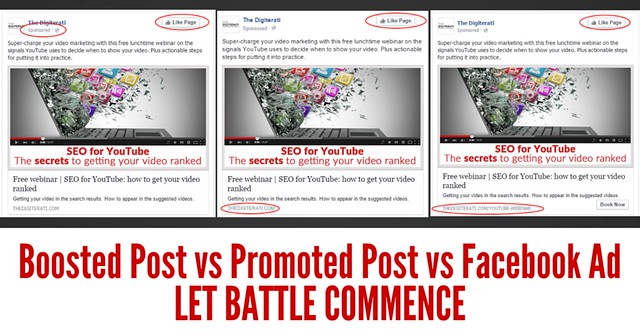
It looks identical to the other method of increasing a post’s reach where the post has been promoted to create an ad.

We have covered many Facebook Advertising terms in this blog series on Facebook Advertising. I recommend you take a peek at the list and familiarize your self or use it as a reference list on your Facebook Advertising Journey.

You're nearly there. . . If you have chosen to Boost your Post I will break down some basics on the next blog post. Good for you getting thru these details and growing your Facebook knowledge.


From the Everyday to the Extraordinary...

Joanne

Posted by Joanne Kleé, 
Owner | Consultant

Joanne Klee Marketing & Events
Service Excellence | Detailed | One Stop Solutions


Come meet me where you are:Twitter | Facebook 
WebSite | Blog

Facebook Advertising | How to Align the Stars. A DIY Series on Facebook Advertising. Part One

A DIY Facebook Advertising Series: Facebook Advertising | How to Align the Stars. Part One

Promoted Post 

Sponsored Post

Boost Post

Newsfeed Ad

Ads Manager


New Facebook terms are taking over our News Feed and giving Marketers, like me, really fantastic ways to target new customers for our clients. What Facebook is developing for advertising is NOT NEW! The advertisement strategy is an old one. However the vehicle we use to get the message out - in this case Facebook - is what's new.


Meanwhile be sure to visit our NEW BLOG HOME at joannekleemarketing.com today.


While the different terms vary for Facebook Advertising there really are 3 basics to understand. I share these types of posts because clients ask me to explain the difference All.The.Time. After all most of my clients have a personal Facebook page. They are one of the 700+million Facebook users. And having a personal page YOU TOO understand the power of having a computer in your pocket. 


Meanwhile be sure to visit our NEW BLOG HOME at joannekleemarketing.com today.


So what really is the difference in the type of Advertisements on Facebook? Below is a breakdown on the types of Facebook Advertising. Which ad method is the best for your business? Well that is going to depend on a number of things. After these basics we will get into WHICH AD TO PICK FOR YOUR BUSINESS in the next post. 

We have covered many Advertising Terms in this blog series on "Facebook Advertising." We have a consolidated list of terms here at our new blog home and website. 

While I will break down the different type of Facebook Ads I thinking we really really need to establish the goal. When developing a Facebook Advertisement, probably to grow your business and advertise your products we will have 2 goals:

ALIGN THE STARS formula:

For any product or service - ever created - in order to promote what your are selling (a.k.a. Marketing) there is a basic formula for success....

1. FIND THE RIGHT AD

2. FIND YOUR BUSINESS AUDIENCE


The right advertisement means the right image, the perfect message and sales pitch, that makes people click thru and ultimately BUY your product. 

Finding your business audience is getting your advertisement in front of the people who want to buy your product. 

If I am selling sky diving services do I want people in nursing homes to see the ad? If I am promoting a new alcohol beverage does the moms group down the street need to see it? As a new mom I can vouch that yes they do!  

Let's jump into the complex world of Facebook advertising and the difference on the type of ads. Remember the STARS ALIGNING goals we listed above. Each Facebook ad will help your reach one goal. The strategy your develop needs to help your attain BOTH goals - to align the stars. 


WHAT'S THE DIFFERENT TYPE OF FACEBOOK AD?

Here we go...

Three Facebook Advertising Types:

  1. Boosted post
  2. Promoted post 
  3. Newsfeed ad 

Each of these is an advertising option on Facebook. It is basically a way of deciding what type of advertisement to run. Goal #1 was to GET THE RIGHT AD. What's the right ad? It is the perfect message that people like seeing. And responding too. We want people to click on your ad and like your page! A Boost post is ideal for those new to Facebook Advertising and for people who do not have experience developing ads. 

While there is an expertise to ad development, ret assured you do not have to work or partner with the hottest most expensive ad agency to get great ads and promote your business. You simply have to advertise. 

As your business grows you will need to stay relevant and advertising targeting your audience and business will be important. In either case, if you do not have the time or the staff you can reach out to me to help you with any advertising aspect - from new and fresh to growing and launching a new product. 


Your Boost Post is ideal because you know people liked it - it is really that simple! 

For example if you had a post that was really really well liked amongst your page followers, maybe it had an extensive reach (all these terms are explained below), this may be the right Ad to run on your page. You can take your popular post and run it as an ad. Alternatively, you can create ads from scratch - develop your key messages and campaign development - and run the new ads as an advertisement. 

Yup, that's it. 


Facebook Advertising, Boost, Promoted, Advertisement, Sponsored How To


See the next Post the Basics to Boost Posts on Facebook (Part Two), I will break down even further the basics of a Boost Post, What a post is and HOW TO FIND your best Post to use.

We will cover many Facebook Advertising terms in this blog series on Facebook Advertising. I recommend you take a peek at the list and familiarize your self or use it as a reference list on your Facebook Advertising Journey.


From the Everyday to the Extraordinary...

Joanne

Posted by Joanne Kleé, 
Owner | Consultant

Joanne Klee Marketing & Events
Service Excellence | Detailed | One Stop Solutions


Come meet me where you are:Twitter | Facebook 
WebSite | Blog


Saturday, March 26, 2016

Why have your Business on Social Media? Facebook vs. Twitter, and the rest? Growing your business.

Do you Use Twitter? Facebook? Instagram? or Snapchat? What's a business owner to do? When selecting a Social Media platform for "advertising" your business services or as a means of attracting clients, Which Platform should you pick? 

Unfortunately there isn't the one end-all-be-all answer. But there are several ways to pick and choose OR integrate the platforms. I am going to help tackle the basics here, and then Ill keep posting on added resources  - so come back often to see more. Look for labels under Social Media Tips.


Meanwhile be sure to visit our NEW BLOG HOME at JoanneKleeMarketing.com today.


"Do you Use Twitter? Facebook?
 Instagram? or Snapchat? What should
you select for the greatest impact? Is
there just ONE right answer?

I have already written in detail Why Blog for Business? And you should! here is a link to all the related WHY BLOG posts is here. But beyond blogging, these other social platforms serve there own purpose as well. 


Like these posts? SEE MORE at our New Blog Home JoanneKleeMarketing/Insights


Why Use Social Media at All?

You already provide a service. You are already excellent at the service your provide. So why not tell the world about it? AND Why not get even better at what you do? As technology changes, depending on your tech savvy grade (A or a D?) you might LOVE all these new ways of communicating or you just loathe it! 

Whether a Lover or A Hater, as a Business Owner you simple cannot ignore it! Social Media IS one of THE ABSOLUTE ways to talk to customers. And since you already pride yourself on being the best at what you do, you really need to stay on top of new trends to remain the best. Becoming familiar with the ways clients communicate keeps you in the conversation, it keeps you "on trend." You do not have to be an expert, but you do need to be familiar. 

The Marketing Example:

As a Marketer I do not build web pages. I do not write code. (I do dabble, in both, tho.) However I am an expert in conveying the clients message. Taking your goal and objectives and turning them into a campaign or piece of collateral so you can reach your audience. I am also an expert in managing a project. And managing the agency or the people you hire to complete the project. That means I need to understand the methods that are available to your message reaching your audience. Staying on trend with social media means understanding the audience of these platforms, understanding how they have competitive advantages, And the cases where they WON't work for what you need to accomplish. Sometimes expertise is knowing what NOT to do.


"I am an expert in conveying the clients
message. Staying on trend with social media
means understanding the audience we want to
reach and the cases where Twitter or
Instagram WON't work for what you need to
accomplish." 

The Answer

Once upon a time in my career we hired an Independent marketing consultant to help me with my project load. This gentleman was a self made man. He was flashy, and energetic, and very knowledgeable about his craft. I walked away with my #1 income lesson about being a business owner, "you want your business to work for you 24/7." If you can figure that out, your business will work for you, and not the other way around."

"You want your business to work
for you 24/7."

Beyond increasing your reach, beyond "free advertising," there is the aspect of service excellence and being available to clients when THEY need you. Sometimes we get stuck thinking "inside the box." We live in our own world, in our arguably "closed" network, unless your are doing business overseas? Outside your timezone? Then yes, you are in a closed environment, with limited clients. And if that is all you can handle, then kudos. But if you want to grow and expand exponentially, then social media is your tool.


Which Social Media platform is right for your business?


The Difference Between Social Media Tools

Here is a rough, in english, no tech jargon here, breakdown of these social media channels that are easily accessible to you. My approach to understanding them from a business persepective is: 

- ease of use
- who is the audience
- HOW to use them
- best vehicle for your message


Facebook

Facebook is a place where we can interact with friends and clients. For business use you can set up a PUBLIC business page. (Personally the main differentiator is you have to give people access to your page. Unless you select making your content and posts public.) 

Facebook is generally viewed as the place where I see what my family and friends are up to. However, sometimes my friends and family are a portal to business. So I don't "sell" my JK Marketing and Events page to them, but I occasionally share a blog post or page and share it on my wall. It's a subtle reminder here is what I do - and the encouraging support is appreciated in return. 

Marketing Strength
Facebooks "opt in" feature - click like on pages you want news from - allows business owners to stay in front of clients, and subscribers. Facebooks competitive edge comes from the ability to let you get "deeper" into the conversation. Twitter is the fastest news breaking access (to millions), facebook let's you discuss the news. Facebook doesn't limit your character count like twitter does, so you can post in detail.  And as new platforms grow on the web, this aspect keeps Facebook as a leader in Social Media. As a business owner know that people on Facebook are not in a "buying mindset." This is NOT the place for a hard sell. But it is a place to "be you, be the brand."  They are here to socialize, catch up on some news stories from pages they "like" and see what going on in there social circle. Or business circle.

- in Summary
Since Facebook is still #1 for traffic that they are the only platform you need to use. However, there is tremendous weight to be added to the value and how it plays a role in business growth. Facebook has some limits, like searching posts, and someone "finding you" organically is limited. That's where twitter plays an enhanced role in your business reach.


"Facebook allows you to
share in depth in ways the
other platforms don't."

- ease of use
Facebook is easily accessible. Theres an app for your phone. Once set up - which is easy! - you can begin by posting photos from your business, ask a client post a testimonial, and link to your website, blog or other platforms. Facebook is a nice tool where you can "manage" comments, as most business owners are concerned about image, yes, it allows you to delete.

- who is the audience
Usually family and friends use this to stay connected and share photos and news. Businesses don't discredit it as a tool! Clients who have a comment about your business, a testimonial, or will use it as a means for people to find you. 

In demographic terms facebook is used across generations. Counter to popular belief younger 18-24 demo uses it for the same reasons the 30+ crowd does. Ease of use, ability to share in depth, and the list/sorting features seeing news from who is relevant to you. Individuals are able to "like" business and organization pages and see IN ONE PLACE what there inner social circle is doing along side upcoming events and news relevant to them.

However the younger demos - when wanting to share with friends - do lean towards "snap chat" for the quick hello or sharing a pic. And if beautiful photos is your business edge, then instagram may be you tool, that you integrate into facebook?

- HOW to use them

Post business photos of your work. Link to articles your followers may find interesting. Link to your other resources and as a way for clients to find you. You can schedule multiple posts for the future, again allowing your business to work for you even when you are sleeping. 

For business owners who carry multiple products, facebook allows you to create pages specific to content. You can has a page specific to use for event updates, and a separate page for content related to your product updates. Allowing users to customize what information they get from you is appreciated and users don't get bogged down with what they don't want to see.

Create excitement and Marketing around a place or event using Facebooks feature for a location or checkin. Users in your area will see this as an option pop up while using Facebook. It is another tool for Marketing that creates immediate presence and is long lasting. You can create a "history" here allowing users to get a great sense of your brand.

- best vehicle for your message
Testimonials go a long way on Facebook. Similar to YELP, however you are able to delete content you feel is inappropriate. Want to share insight on a trend? Want to provide feedback? Facebook allows you to share in depth in ways the other platforms don't. 

Twitter

Twitter is amazing! Fast access to news and events at your fingertips. When CNN entered the cable news market as 24-hour news access around the world is was a game changer. When iPhone was invented to have the "internet in your pocket," or CD's "to hear an entire concerto uninterrupted" - yes, it is that level of game changer! 

Twitter is fast access to any content because of the use of Hashtags - you know that little pound symbol "#" followed by key words. In twitters search field, you can see the "Top Trending" hashtags for news in your area. You can also search key words, persons, places, events, and get tweets relevant to that topic. As opposed to Instagram hashtags which are usually more unique, twitters hashtags are generally more common so your tweet and content is easy to find.

Along those same lines twitter can be overwhelming. Searching thousands of tweets is not anyone's definition of a good day. Perhaps for political junkies who can't get enough of a news story? 

For business twitter gives you access to the 24/7 audience to grow your business! I credit twitter as the #1 increase for my blog readership (up over 50%) and for increased document sales by far! My scribd document store is approaching 100,000 page views (including sales increase) and that growth came in a 2 year period since I started tweeting for business!

Twitter allows Marketers to search content on the competition, on trending topics, and get instant feedback from clients, both wanted and unwanted!

Twitter DOES NOT allow you to go in depth in your tweets, being limited to 140 spaces to write your post.  However it does let you post information to a relevant audience using Hashtags specific to your message. Later users can search the hashtags to get more of the same type of information from you. or if you come up in their news feed they can click thru to your page to learn more.  

- ease of use
Twitter is easy to set up an account and also has an app for your phone. You can post on the go and tweet, retweet and become part of the news feed 24-hours a day. 

- who is the audience
Twitter is heavily used by people wanting that 24 hour access to news and events. Information that is "trending" is on twitter. Users on twitter want to say something and be a part of the trend. 

The key audience here is those that are not in your "closed network" that I mentioned above. Twitter exposes you to users beyond your reach. Additionally, twitter makes you relevant by having a presence - see next paragraph. 

- HOW to use them
Immediate long lasting content. Event and area specific relevance. Twitter also gives you access to a worldwide audience. 

Apple, the largest company in the U.S., does NOT have a twitter page. Mentions of Apple are either hashtags #Apple or just mentions. Apple chooses not to use twitter as a vehicle and they can do that. I would argue however that in the "small business" under $1 million in revenue having a presence is better than not. 

Create hashtags or comment on those trending to have a presence in a global market place. Encourage blog readership by linking to articles and creating organic content.

A frequent twitter use is to generate excitement around events. Create a hashtag for your wedding, similar to a Facebook check-in. 

- best vehicle for your message
Link to articles, news stories, events and great access for your client network. I posted extensively on How to use twitter for business here. I encourage you click through and give it a read. And more tips on tweeting for business are in this post on Social Media for Business and Using Twitter.


Instagram
Did someone say photos? Instagram is an instant avenue to search - in Photos - a person, place, news story or event. Do you make a beautiful product that you sell on etsy? Yes, instagram is the place for you. So it twitter so you can have buyers beyond your area code. Instagram also has a search feature so users can get to content that want to "see" fast.

Frequently celebs are on Instagram showing their day to day life, experiences and outings. However for those of us selling a product that can be shown, Instagram is an excellent method of showing off your work. 

Hashtags "#" on Instagram are generally unique. Long hashtags capturing how we feel and commentary on the item. Altho for business purposes, I would include some standard common Hashtags so your photo can be easily found. 

The first two tags are common and the unique on at the end: for example an etsy jewelry designer #beautifuljewelry #custommade #Chicagoskylinespeciatly 

- ease of use
Yes! Easy account sign up, an app and access to your smart phone camera for on the go shots. 

- who is the audience
Lovers of photography. 

- HOW to use them
Post photos of your work. Be included in the conversation where users like to see what's being discussed. In a celebrity related business or selling beautiful things, clothes, or the like - then instagram is a must alongside twitter. 

- best vehicle for your message
If you use photos. 


Snapchat

Chitty chitty chat chat. Like to talk about your work. Have time on long commutes to "hold a conversation" about a product or service. Like interacting with people about your message on their time and at length. Then Snapchat is a tool you can use. While Facebook allows for an in depth feature on your service, snap chat allows for the in depth conversation.

Similar to reddit or twitter for holding a conversation, however you need to sign up for snapchat to be a part of the conversation. Where as twitter allows users to pose more questions and reddit allows more of a dialogue in a forum.

- ease of use
Yes! Easy account sign up, an app. Post a pic along side your conversation with access to your smart phone camera for on the go shots. 

- who is the audience
Mostly the 18-24 age demographic, and those celebrity types and service providers wanting to access this audience. 

- HOW to use them

For having a conversation around your product or trend. 

- best vehicle for your message
Depending on your time commitment.


Linkedin

Linkedin is a stationary place for your resume and business networking format to connect with work colleagues and vendors. It is your business profile in one place. You can connect or "link in" with colleagues in your field and co-workers. A way to stay connected as the years pass and see what jobs people are in. Update your online resume easily. Link to your organic content from the blogs, tweets or facebook pages you create. 

Linkedin is a Professional tool as you business face. A feature O love to encourage use of is asking clients to write a Testimonial. They can also "endorse you" for a service aspect you provide. Endorsements also service as a way for you to stay "in front" of clients and network opportunities for you. 

- ease of use
If you have a resume or a professional profile it needs to be on Linkedin. It creates credibility for your business. 

This tool however takes time to build. Fill in the professional resume layout noting work history. Take time to write you content and revise it regularly to stay fresh. Don't expect to be done with everything Linkedin can do for your in one day. This is a place to build presence like Facebook, however it is very specific to your Business Resume - the Brand in detail.

- who is the audience
The theory of 6 degrees of seperation is a power house behind LinkedIn. You start by connecting with people in your network, workplace or email contacts. The exponential growth goes from there. People you know have contacts, and you can connect with those potential clients. Yes, I know, I am telling you that you have a tremendous networking tool at your fingertips... when used correctly. 

- HOW to use them
Post your resume, and add people and co workers to your network. Keep adding and expanding your network. Post articles, and relevant content to your groups and audience. 

- best vehicle for your message
A well worked on resume and links to your work. 

Pinterest
I remember the days of keeping a cork board full of ideas clipped from magazines. Or those articles thrown into a folder. Well now we have an electronice version of that. A Pin board platform. 

Pinterest allows you to search pins others have pinned. You have multiple boards to keep ideas sorted by interest, subject or any method you choose. Pinterest is a nice way to interact with clients by sharing articles, color schemes, locations or other ideas via a shred board.  

- ease of use
Easy to sign up and get started. Has an app for the on the go addiction. 

- who is the audience
Everyone uses pinterest. Artists, designers, marketers. Now there is a selling component for those etsy designers or document seller ;-)

- HOW to use them
Post your blog articles to a business board you have created. Keep track of ideas for a project your working on. Share relevant content to others in your audience. Especially nice to share ideas with clients to help build a concept. You can pin directly from web searches too. So you are not limited to what others have pinned already.

- best vehicle for your message
If you have photos related to your work, or articles, you can have a pinterest board for easy sharing.


Regardless of the platform you choose, there is a method available for your to manage easily and comfortably.

Thanks for reading,


From the Everyday to the Extraordinary...

Joanne

Posted by Joanne Kleé, 
Owner | Consultant

Joanne Klee Marketing & Events
Service Excellence | Detailed | One Stop Solutions


Come meet me where you are:Twitter | Facebook 
WebSite | Blog