Showing posts with label Tips and Tricks to Blogging. Show all posts

Friday, January 29, 2016

Blogging Tips and Tricks: A Summary of Links to enhance your Business Growth, A Wrap Up Post

Many an agency will keep SEO tips a guarded secret. I don't find a reason to do that. Content needs to be excellent to remain competitive. Keep your content professional, crisp, and up to date and you will keep that competitive advantage too. 


Good luck with your blog. 


Like these posts? SEE MORE at our New Blog Home JoanneKleeMarketing/Insights


Welcome to Organic Marketing in Action,
Also Known as Blogging about YOUR Business: Part I

More tip and Tricks when Blogging for Business a.k.a. Organic Marketing Part II

Once you have some content on your sight you can create pages as tabs under your blog header (like this one!): Blogger tips for creating pages and tabs

Social Media as a Small Business Marketing Tool


JK Marketing and Eventd
Blogging Tips and Tricks: A Summary of Links and Ideas you haven't seen! 


Why JK Marketing and Events?

Expertise matters:

And who am I to tell you this?

About Me


From the Everyday to the Extraordinary...

Joanne

Posted by Joanne KleĆ©, 
Owner | Consultant

Joanne Klee Marketing & Events
Service Excellence | Detailed | One Stop Solutions


Come meet me where you are:Twitter | Facebook 
WebSite | Blog


Content Copyright protected. Include a link to this post when Sharing or Quoting any aspect of this blog.

Thursday, March 26, 2015

Blogger Tips for Creating Pages and Tabs

Blogging is simple. It takes a little time and effort to learn some basic short cuts in order to achieve the look you want for your blog. Do you like what you see here. I spend the bulk of my time on clients, so getting my blog layout done I reference others who have tutorials on getting the layout completed.


Creating Tabs via Pages 

I like blogs that create quick links at the top of their page. It makes navigating super easy for my blog visitors.


Here is the tutorial I used to achieve my pages link.


Like these posts? SEE MORE at our New Blog Home JoanneKleeMarketing/Insights


Creating a Contact Page 

Blogger allows you to create a contact me gadget as a sidebar on your blog. However in the mobile view mode this contact widget isn't accessible to blog readers. I was my blog accessible in the way that you the viewer uses it. I don't want my customer having to take extra steps to reach me.


Here is the tutorial I used to create a contact page, then made into a blog tab.


Blog on the Go

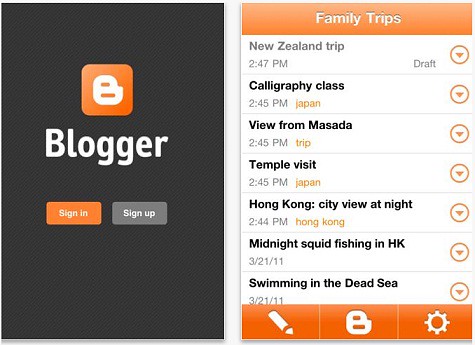
Use the blogger app to post blogs on the go. By nature consultants have their business on the brain all.the.time. So when there is a blog post or new innovative anything you can post on the go.


JK Marketing and Event Management Pics
You have a computer in your pocket. Leverage the powerful tool that it is.


Blogger on iTunes


Blogger for Android at Google Play Store


Want more blogging tips and tricks:


Follow me on twitter: @Jkleemarketing


From Everyday to the Extraordinary....
Service Excellence | Detailed | One Stop Solutions

Posted by Joanne Klee,
Consultant Principal
JK Marketing and Events

Content Copyright protected. Include a link to this post when Sharing or Quoting any aspect of this blog. Thanks!

Saturday, January 17, 2015

Social Media as a Small Business Advertising Tool

Social media IS a tool to help promote your business. But where to begin? And the management of it can feel overwhelming. 

But I would argue with the innovations of cell phones and technology you can make blogging and running a business far easier then ever before, to post to twitter and facebook from your phone! A few keys to my success on building my social media presence will follow, but first a secret...


Don't worry about your "followers" when you start posting. Counter to the advice you've read, social media, in this case twitter readers have many different habits. Yes, some will only read those who are in their news feed. However some users follow what's "trending" others search key words to explore what's been posting lately. Twitter will email you a weekly feedback page on your posts and number of page views. I have a mere 32 followers upto 132 followers as of today, but I have had weeks where page views for my posts have been 1,500 views and more. So while having regular followers shows people have an interest in your posts, meaningful content and tweets will be seen by relevant people.


Like these posts? SEE MORE at our New Blog Home JoanneKleeMarketing/Insights


What is YOUR Social Media Objective?

Twitter can help drive traffic to your blog or web page, which for me is extremely relevant since I sell documents online. Twitter helps drive traffic to my JK Marketing and Event documents at the scribd store. My docs are a form of income for me, so driving more worldwide traffic to help increase sales is my business goal. For your business you should also have an objective when building social media content. Having a presence on the web is critical in this day and age when the Internet has become a tool and resource for your clients. And as I have said in previous posts, it adds credibility to your business.


Follow me on Twitter @JkleeMarketing 


JK Marketing and Event Management Pics

As for my business documents mentioned above, I prefer Scribd for their policy on document ownership, profit split on all document sales and ease of use. Find my pages and documents for all your Marketing and Event Planning needs at https://www.scribd.com/JK_Marketing


You will even find unique Marketing resources for special projects and customer service excellence (communication is key!).

I use Twitter as my vehicle to get information our to Worldwide potential clients that documents are available. And while my followers have not significantly increased my document sales profits have - which is really all that matters right? People will "search" for a resource to meet their current needs, and when I post to twitter using #hashtags relevant to my documents, a search engine like google will quickly return a twitter search, using those specific #hashtags (successful integration of SEO as an advertising tool). This blogs traffic is not at a twitter viewership level, so instead I will leverage twitter to meet my business needs.


Make a plan on What to Write and start Posting, Tweeting, etc.


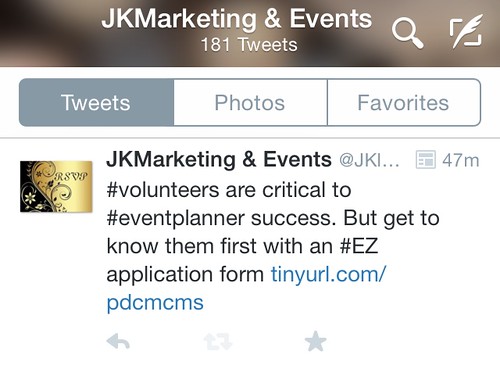
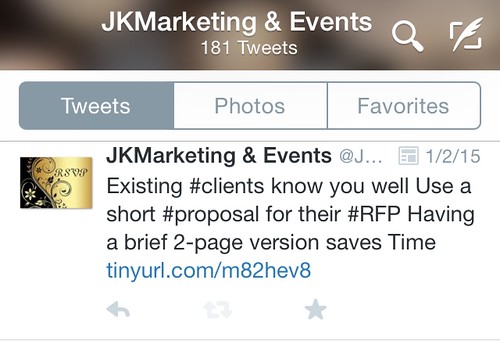
Examples: Here are 3 recent posts to help promote my business online.

I post my documents to twitter to gain access to a worldwide audience. Of course there are retweets to relevant articles. NOT retweets that you find everywhere, instead I try to reference interesting unique pieces that arent crawling the web everywhere.


Volunteer Application Promotion - linked here.


jkleemarketing@yahoo.com Marketing and Events Web Photo Hosting
Short Proposal and RFP


jkleemarketing@yahoo.com Marketing and Events Web Photo Hosting


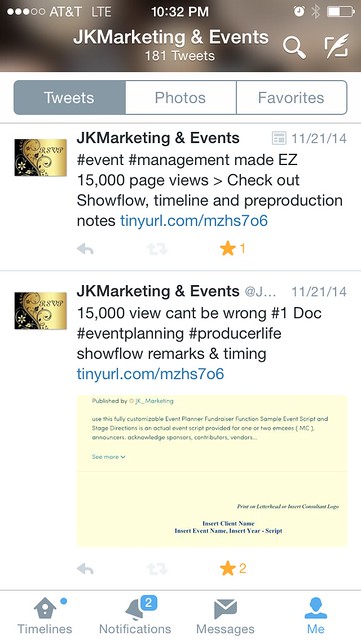
And sometimes self promotion helps lend to credibility. When one of my documents had 15,000 page views... (My store is upto nearly 100,000 pageviews as of 2016!) I knew I had something valuable. So OF COURSE I posted the news to twitter.


Jkleemarketing.blogspot.com


(While blogging on my iPhone, I had a minor issue - I can't immediately upload photos to blogger. So instead here's the link to click through to the 15,000 views post... Think outside the box. How to: using the switch page view feature on safari, save your blog post - especially important because when you leave the blogger page it will occasionally not save your changed. Imagine losing an entire post!!  I logged into twitter web page, not via the app, clicked on a twitter post I want to feature, and select all on the web page address, copy. Then I return to this blog post, and paste the link.)

Similarly, the method mentioned above is the way I post to twitter.


Posting Your Business Web Links to Twitter

I use an easy method to post to twitter.

- I keep a page to my scribd store open in the safari Internet App.

- I keep a page open to tinyurl.com also. This saves me time not searching for the pages. I use tinyurl so my twitter feed stays clean, and my twitter posts contain more key words and #hashtags versus my 140 precious characters being eaten up by the web address to the link.

- I find the document I want to feature and click on it, this way I get to the documents dedicated page which contains its full description. Copy the URL. Paste into Tinyurl.com to make shorter. Copy the link. Then I go to my twitter app, and start a new post. I try to #hashtag my keywords and paste in the tinyurl. I can usually get 2-3 posts done in 15 minutes.

A quick way to help promote your business.


Service Excellence | Detailed | One Stop Solutions


Posted by Joanne Klee,
Consultant Principal
JK Marketing and Events

Content Copyright protected. Include a link to this post when Sharing or Quoting any aspect of this blog. Thanks!

Thursday, November 13, 2014

More Tips and Tricks When Blogging for Business, AKA Organic MarketingPart II

Blogging for business doesn't have to be difficult. Organic marketing infers that it's a natural process. I don't think I have said this enough, if your not comfortable blogging that's okay, you can pursue other routes to market your business. You can also hire a consultant, say ME, to blog for your business. Yes that's a niche service I can provide. But if you like blogging, once a week or few times a month, it can only aid in your business.


Why Blog?

As I shared in my first blog post, click here, clients and vendors like to understand more about your business. You will nurture your business by blogging. It is a reflection tool for you, on your industry, your insights, and providing a resource for clients.

Welcome to Organic Marketing in Action, Also Known as Blogging about YOUR Business


The blog gives you an opportunity to share Who you are and the services you provide.  They also like to see a legitimate footprint, for consultants this is priceless. Especially if you are active on twitter, gaining credibility couldn't be easier. A social network helps create that footprint, and a blog adds insight to your business services, products, your business style and You!


Like these posts? SEE MORE at our New Blog Home JoanneKleeMarketing/Insights


Create Links

Did you see what I did there? Just above, "click here." I linked to my own article. Another easy SEO (Search Engine Optimization) tip is to have a link within your post. For example in all my articles I make mention of my document sales at the scribd store, and link to the store site. More coding and sharing within the Internet web adds to a better chance of being a top result in a search engine results list. I prefer to link to my own articles and credible sources. Even a book on amazon on occasion. My rule: to always remain professional, guides this principal.

JK Marketing and Eventd
Nurture your business. Reflect on industry. Blog About it.
Content Marketing is for your too.

Highlight your Articles

Did you also see my first post in Really Big Letters up there.... That's a nice way to call out other posts you've written - and don't forget to LINK the words to the web page (like I did initially).


Get the App

I love the blogger FREE app. When I have ideas on the go, even overseas, I can post my thoughts and save the post as a draft, or publish the post. The app is simple to use and helps with grammar as it features spell check red underscores, just like the web based blog page. Sometimes editing is a little easier for me on the go - between meetings or school pick up. It just makes it easy to draft a post, versus "writing in an iPhone note" and copying or emailing it to myself (so old school).

Unfortunately the nature of consulting is that your business is "on the brain" often! I may look like I'm sleeping, but I'm really reflecting on the event plan and scraping that budget to get more bang for the buck!


Schedule a Post

So I like to bulk post. I manage my business, sell documents online, hold client meetings and just like any business owner I am busy! But efficient. Use tools that your blog provides. I use bloggers Schedule feature. I write or update a post, in the blog app as a draft. Then when I have some scheduled PC time, I edit the post and just under the spot where I add my labels is the "Schedule" link with a clock icon next to it. Go ahead click thru and schedule your post to "go live" as a certain date an time. Most social network services will tell you that users post a lot on Fridays and Saturdays. Content then appears fresh in newsfeed on Twitter and Facebook at the top of the audience feeds.


Update Older Posts

Search Engines really like fresh content. SO if you have a post from 6 months ago or 4 years ago, click and edit your post. Add an update in the beginning of the post (maybe one or two sentences) or add a story with detail at the end of the post. This will "refresh" your article and add an updated DATE to increase SEO as well.


Add "other searched Labels" to Your Post.

Blogger lets you see the links that brought people to your blog. Scribd, my documents store, allows you to see the words people used to search for your documents. Add these search terms to your labels ... it will expand the audience in your SEO AND you are responding to the audience by staying "fresh" and using "updated" terms and trends.


Back up your Blog Posts

Things change. Free today, gone tomorrow. Or perhaps you grow and need a bigger bolder website. You want to keep your blog posts right? Then Back Them Up. Save a copy to your notes. Copy and paste the blog and email yourself. Save as a word file and keep them on your back up drive. Just do it. 

Things go wrong in electronica land, and that's frustrating, trust me I Know!


Get a Website to Host Your Pictures

I learned the hard way. On a recent trip to Japan, while traveling on the bullet train, I was wifi uploading pics to my blog... or so I thought. Blogger only hosts (or shows) 1GB of pictures. That's nothing! 20 posts in, I go to view the pictures and post and see these annoying little grey squares. Terrible! I researched the issue and found that you need a photo hosting platform where you can upload your photos, and then embed links into your blog. There's lots of tutorials out there and after making a selection the process is relatively easy. I recommend either google drive or Flickr. Free photo hosting, easy to embed links, and after some trial and error, and reading a good guide, you'll get there! Good Luck!!


Add a Tag line

I've blogged about my Educational and Cultural exchange trip to Japan (via my husbands grant for the trip through the JCCC) and I also maintain a personal blog for the past few years. Over time my tag lines to posts evolved. You don't have to have a tag line, but I think its a nice close to your blog thoughts. Some bloggers end with questions to their audience. But as a marketer I believe in branding. And one method is tag lines. Jingles too, but were not on a podcast, yet! It also indicates just that, a closing, that this post has ended.


Reach me on Twitter @JKleeMarketing 
or call directly 773.677.0783


          JK MARKETING AND EVENTS

From Everyday to the Extraordinary...


Posted by Joanne Klee,
Consultant Principal
JK Marketing and Events
Welcome to Organic Marketing in Action, Also Known as Blogging aboutYOUR Business: Part I (a guide not just an article)

When starting your own blog, as I have here, frequently people will join the blogging community and NOT have a clue on what to write. Those who know me say I've been blessed with the gift of ideas and the ability to find topics for discussion. And I hope you find the same.

But what to write???


Like these posts? SEE MORE at our New Blog Home JoanneKleeMarketing/Insights

Write what you know. 

This blog is dedicated to my consulting business. You will see Marketing and Event Management related articles. Also some blurbs from me on ideas I have explored with clients or ideas for my personal business. I'll also use this as a platform to explore business ideas, and will put my "brain" on paper. I will also take pop culture topics and relate them to my business. 


My process on decision making to follow one path or another is one unique aspect of working with me. I don't make random decisions, just relevant recommendations. I think every aspect of Marketing and Event Management needs to be handled as an important item, getting well deserved planning and thought. So I write about just that ...


"As you write, more of your business philosophy will be shared, and more about you. Tell people who you are, and show your expertise..."

Reflecting is an important aspect of my personal life, and business too.  Aside from how reflecting on my experiences has helped me be a better business owner (and wife, partner, mom...) I think it's how we improve our customer service and improve the client experience in business too. 


Reflecting helps us avoid problems before they occur, and improves my protocol for events. Am I VERY Detail Oriented, Yes. Perfect, NO. But I always improve and learn personally and professionally. You will see some of those reflections here in this blog.


Write About Your Business in your Profile and as a Post

As you write, more of your business philosophy will be shared, and more about you. Tell people who you are:  it can be detailed or simple. But include details about your company. At the bottom of your blog is the optional profile. Fill that section up with information about your business. And blog about it. Users (err... clients) should be able to access info about you in the way they like, so multiple options is a good thing.

Since we are on the subject, here's me:


Posted by Joanne Klee,
Consultant Principal
JK Marketing and Events
That's Me. And here is how you can RSVP ... 773.677.0783


Link In To Your Social Networks

Flickr, Twitter, and Facebook, these are all avenues you have probably heard of to help "build your social network." I think there's a balance to soft selling and bombarding people's feeds with your blog or business articles. 


JK Marketing and Events
Give clients access AND expertise. Use Social Media and Expand your business toolbox.

I have personal accounts for my personal life and family stuff, and a business profile. When my clients are in business mode from 9-5 they can see my business content. And since I am online ... it's also available 24/7.


Google Drive: Event Photos

As my blog evolves you will see a link to my Google Drive Photo feed or Flickr with my event and marketing photos. It's another way to have your portfolio online. (And write a blog post with portfolio photos highlighted.)

Twitter: You will see my JK Marketing and Events twitter feed where you can follow me @JkleeMarketing for marketing, business and occasional science (for the geek in me) related content.


JK Marketing and Event Management Pics
Start a twitter account, and leverage the free advertising.


LinkedIn:

Under my Consultant Name: Joanne Stadnicki Klee is my Linkedin profile, these links are just another way to expand access to ME through one avenue of my social network. If you're a LinkedIn user you can access my profile and endorse me for the products and services I provide.

Clients can find my business footprint with ease and shouldn't ever have to search for a link!


Keep it Professional

Frequently new clients will search you out, and the internet makes that so easy. Clients want to see your online footprint, especially for a "marketing consultant," aye? The online footprint you create helps clients research your services, and your style of business. AND Your Professionalism. So keep your blog and social network locations All. About. Business. If you have personal content and pictures of your adorable kids, well put that on your personal blog. Okay, maybe the occasional holiday card can get posted.


"...Keep your blog and social network locations All. About. Business."

But another feature of blogging for business is you can "direct" people to highlights you WANT them to see:


> > > find my press release for an Boxing Fundraiser here. Our "Amatuer Boxing Fundraiser Helps Knock Out the Effects of Poverty" < < <


Include Information About Your Business

Frequently, consultants who provide niche services, and who are still building their brand, have to do some "extra selling" to make clients aware of all the services they can provide. Your blog can easily host a post on your services profile. Whether its a checklist of your business services, or some exciting testimonials that clients have provided you. Appreciation quotes, or specific event related thank you's, ask permission to share the kudos and publish them on your blog! 


A note about Blogging and Business Competition:


Yes, their is a balance to putting out "too much" information about yourself and your company because of the competition. The balance is getting enough information available to potential and existing clients, and withholding anything cutting edge to keep it for your professional purposes.

So along the lines of my detail oriented services - you need to LIVE the idea of competition, and where that balance between information and business privacy lies. You too can research the competition. Why? So you can see for yourself this fact:


". . . You are a unique provider or product for 6 months to a year - That's It. Make the most of your time."

Depending on the field, your product (especially Apps) are "unique" for about 6 months before someone else can provide a similar service and try to do thing better than you. And they will be better.*  The content on your blog ISN'T what makes you stand out in the competitive market  - instead your expertise is. I hope!


Consider this fact.

There are millions of Apps available at the App store and in the Android market. 
When a new app enters the marketplace, they are "Unique" for about 6 months, before another developer puts out a similar, better product. OUCH! I Know that hurts when we hear it, but that's the nature of competition. And there are ways to overcome this cycle ( I feel another blog post populating my brain on this subject,...).


A note about evolution of the Competition:

The competitive developer will research your product, your launch, and your customer service and try to improve on every aspect. They will launch a competitive app - in their style - and improved upon your products ideas.

If you read the 1st paragraph in this post What to Write, and reflection, well this is where reflection squeezes in. . .  Reflect on your product and services so you can be better. Reflect on your competition, what are their gaps? Do better then them!


* Did you see that * asterisks above ... it's noting this: Even tho someone may market themselves better, and fix some of your product tweaks, and do make an amazing product launch (because they have loads of funding/time/resources) doesn't mean that you shouldn't remain in the market, and have a piece of the pie.


I also hope that you will develop that unique piece of your business that can't be duplicated. In my case, in a world of consultants galore, I am the unique piece.


Key business drivers: Professionalism... Knowledge + Wisdom = Experience. And with my extensive experiences in business and life comes professionalism.


Include a Picture in your Post (A.K.A. Oversimplified Search Engine Optimization (SEO)

In addition to linking your post to a tweet and perhaps on your Facebook page, you will want other internet users, even those not in your network to find your posts, right? That's called SEO, Search Engine Optimization. Simple steps to starting your blog being found:

Do You have a blog address = check

Do You have a title to your post = check
Do you have a picture = check


Add a picture, at least at about 100 words or more into your article = check.


WHY INCLUDE A PHOTO?

You are human right? The picture ISN'T for SEO - that part is for the human eyes which are reading the content. Sometimes when clients share an article on Facebook, it'll have a photo attached to attract attention to the post. Same goes for those who conduct business ideas on Pinterest. They need a picture to PIN the article with.

Why put the picture about 100 words in? When you click on the HTML tab above in a new post page on blogger, you will see the post code. In a test post, paste or link to a picture. Now click on the HTML tab... there's alot of code, but no picture. Rest assured your pic will be there. But the code os the core of computing language. So when someone googles "Article + Welcome to Organic Marketing in Action, Also Known as Blogging about YOUR Business" the search engine will find the Title, web address, and first several lines of your posts "html code" to bring back search relevance. Would you prefer the search engine, in this case google, find your pictures HTML code which has NOTHING to do with your article? Or find the first several lines of your post which hold relevant content? (You picked the latter right? Good.)


Include a picture for the humans who are doing the reading and who like things to look pretty. Make the picture relevant to your article. Also try to add pictures that you have the rights too, that means you own pictures. If you simply google pictures and copy those you are very likely infringing on copy writes, no,. no., no!


Add Tags or Labels to your Post

Again, if you want to be found by search engines, add labels. This maximizes finding your post. Label with your blog topics, title, your company name, and what others may search.

There's other tips and tricks to blogging (ooh, I think I'll make that a label to use on the blog) and I'll add posts on them the future. So when you can, click on the label below - that says Tips and Tricks on Blogging - to easily find that next post.


Service Excellence | Detailed | One Stop Solutions


Posted by Joanne Klee,
Consultant Principal
JK Marketing and Events


From the Everyday to the Extraordinary
Service Excellence | Detailed | One Stop Solutions
twitter @JKleemarketing 
scribd store: scribd.com/JK_Marketing
Content Copyright protected. Include a link to this post when Sharing or Quoting any aspect of this blog. Thanks!